News Multimedia Icons for Modern Storytelling
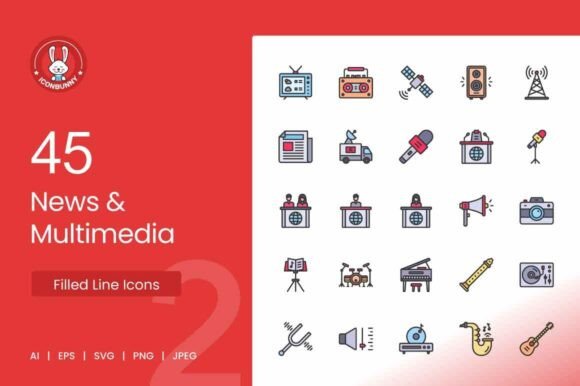
In the fast-paced world of digital media, visual communication must be immediate and precise. Whether you are a designer building a news dashboard, a podcaster creating show notes, or a marketer developing a press kit, the icons you choose act as visual anchors. They guide the audience, reinforce your brand, and simplify complex information. This is where a dedicated set like the News Multimedia Filled Line Icons steps in, offering a cohesive visual language for the modern storyteller. This pack of 45 meticulously crafted icons provides a professional toolkit to represent everything from breaking news broadcasts to the nuances of content creation.
A Cohesive Visual Vocabulary for Digital Media
What makes this icon set stand out is its carefully curated "filled line" style. It strikes a perfect balance between the clarity of solid iconography—which scales well and reads clearly at small sizes—and the modern, lightweight aesthetic of line icons. This makes the pack exceptionally versatile. You can use it for a high-traffic news website, a polished mobile app, or a printed press kit without losing consistency.
The set covers the full spectrum of modern media. You get foundational broadcast icons like the TV, news anchor, and satellite dish, alongside digital creation tools such as the camera, microphone, podcast symbol, and editing tools. Essential publication icons—the newspaper, blog, and breaking news banner—round out the collection. Every icon is crafted with clean, precise lines at 1024x1024 pixels, ensuring crisp display on retina screens and sharp reproduction in print. The inclusion of AI, EPS, SVG, PNG, and JPG formats means you can edit them deeply in vector software or drop them directly into a presentation. For anyone working in media design, this is a complete visual toolkit delivered in a single, consistent package.
Tailored Applications for Every Media Professional
The true value of a professional icon set lies in its adaptability. Different users will find distinct ways to integrate these assets into their workflows, solving specific communication challenges.
For Web and App Designers
User interfaces rely on intuitive navigation. Use the video player or TV icon to lead users to live streams. The photo gallery icon is perfect for multimedia sections, while the radio or podcast icon can distinguish audio content. Because the icons are fully scalable vectors in SVG format, they integrate seamlessly into responsive designs and maintain perfect alignment with typography. The 72 DPI base also makes them ideal for high-fidelity mockups and client presentations.
For Content Creators and Bloggers
Your website and media kit are your storefront. Replace generic clip art with these professional symbols to elevate your brand. Use the microphone and podcast icons on your podcast landing page. Feature the camera and editing tools on your video production services page. For bloggers, the blog and headlines icons can visually separate categories or featured posts. This consistency tells your audience you are serious about your craft and your brand identity.
For Marketers and PR Teams
Press releases and email newsletters often struggle with visual engagement. Instead of sourcing inconsistent stock photos, use these icons to create a clean, branded layout. The breaking news icon is perfect for highlighting major announcements. The newspaper icon can anchor your "In the Press" section. For social media campaigns, these icons scale beautifully for Instagram carousels, LinkedIn documents, or Twitter headers, providing a professional polish that builds trust with your audience.
For Educators and Journalists
Teaching media literacy or explaining a newsroom workflow? Visual aids make complex systems digestible. Map out the journey of a story using the satellite dish for field reporting, the camera for footage, the editing tools for post-production, and the TV or newspaper for distribution. This set gives you the exact vocabulary needed to explain modern journalism in presentations, handouts, or online courses.
From Concept to Completion: Creative Project Ideas
Moving beyond basic usage, here are several concrete ways to apply the News Multimedia Filled Line Icons in projects that require a polished, professional finish.
1. Building a Branded Media or Press Kit Page
Every serious organization needs a dedicated media page. Design a clean grid layout where each icon serves as a large, clickable visual link. Pair the microphone with "Press Releases." Link the camera icon to a "Brand Asset Gallery." Use the news anchor icon for "Media Coverage" or "In the News." This approach instantly communicates purpose and makes navigation effortless for journalists and partners. The consistent line style of the icons ensures the page feels cohesive rather than cluttered.
2. Structuring a Podcast or Video Series Website
If you produce a show, your website needs to guide visitors to episodes quickly. Use the podcast icon to denote your main episode feed. The microphone icon can lead to a "Behind the Scenes" page. The editing tools icon is ideal for a "Resources" or "Gear List" section. For a video series, use the video player and TV icons to categorize content by format. This intuitive navigation mirrors professional streaming platforms and improves user experience.
3. Designing an Engaging Infographic or One-Pager
Infographics thrive on visual variety. Use the icons in this set to represent different data points or stages in a process. For example, an infographic about "The State of Modern Media" could use the newspaper icon for print statistics, the TV icon for broadcast data, and the blog or podcast icon for digital growth. The uniform line style ensures the infographic remains readable and professional, allowing the data to take center stage while the icons provide visual context.
4. Enhancing Social Media Visuals and Templates
Social media managers need to create high volumes of content quickly. Having a consistent icon set streamlines template creation. Build a "Newsroom Spotlight" series for LinkedIn or Instagram using the news anchor or headlines icon. Create a "Podcast Preview" template featuring the microphone icon. The SVG files can be colored to match your exact brand palette, ensuring every post reinforces brand recognition.
Practical Strategies for Maximum Impact
To ensure your projects look cohesive and professional, follow these practical guidelines when working with any icon set, especially one as comprehensive as this.
- Maintain consistency in scale and weight. The filled line style is designed to work as a system. Avoid scaling one icon significantly larger than others in the same layout unless you are intentionally creating a visual hierarchy. Keep stroke weights uniform to preserve the set's harmony.
- Use color with deliberate purpose. The clean lines of these icons respond beautifully to color. Consider using a single accent color to draw attention to specific actions, like a red breaking news icon or a blue video player icon. Monochrome settings (black, white, or gray) work exceptionally well for professional documents or minimal UI designs.
- Leverage the vector formats for customization. The included AI and EPS files are fully editable. Don't hesitate to combine icons, add a subtle background shape, or modify a detail to perfectly match your project's needs. This flexibility is one of the strongest arguments for using a professional vector pack over free alternatives.
- Match the icon to the audience and context. The pack includes both specific broadcast tools (satellite dish, news anchor) and general digital media icons (blog, photo gallery). For a general audience, stick with familiar symbols like the microphone or newspaper. For industry-specific projects, the specialized icons add credibility and precision.
Investing in a high-quality, themed icon set like the News Multimedia Filled Line Icons is an investment in your brand's visual intelligence. It saves design time, ensures consistency across platforms, and communicates a polished, professional image. Whether you are launching a blog, revamping a news portal, or building a digital media kit, this pack provides the visual shorthand needed to connect with your audience instantly and effectively.