Police Colored Icons for Clean, Practical Design Work
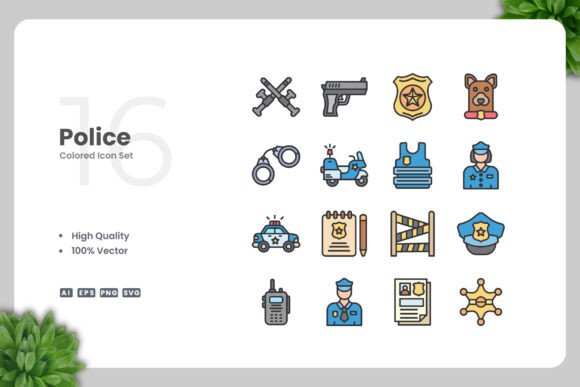
You are working on a community safety brochure, a police department website, or a mobile app that helps people report non-emergency issues. You need icons that look professional, communicate clearly, and fit smoothly into your layout. That is exactly where Police Colored Icons come in. This set offers a simple, clean collection of vector graphics designed around law enforcement, public safety, and emergency response themes. Instead of hunting through generic icon libraries or settling for clip art that looks dated, you get a focused pack that works across almost any medium you can think of.
What Makes Police Colored Icons Different
At its core, this icon set is built for versatility. Every file is 100% vector, meaning you can resize it to fit a tiny mobile button or a large poster without losing clarity. The colors are already applied, so you can drop them into a project and move on. But if you need to match a brand palette or adjust the tone, you can open the files in Adobe Illustrator or CorelDRAW and change anything you want. The set includes source files in Ai format, EPS version 10, SVG, and PNG with transparency. A readme file walks you through the contents, so you never feel lost. This is not a massive bundle of random shapes. It is a curated selection of police-themed icons that follow a consistent visual style.
Where You Can Use Police Themed Icons
People often ask where a specialized icon set like this actually makes sense. The answer is more places than you might expect. Let me walk through some realistic scenarios.
Websites and Mobile Apps
If you run a neighborhood watch site, a legal resource platform, or a local government portal, you need navigation elements that users understand instantly. Police Colored Icons work well for menu items like "report a crime," "find a station," or "emergency contacts." The simple design keeps your interface clean, while the color helps these elements stand out without cluttering the screen. For mobile apps, the vector format means you can scale icons down for tab bars or up for onboarding screens without any pixelation.
Print Materials Like Flyers and Banners
Community organizations, police outreach programs, and safety campaign coordinators often produce flyers, posters, and banners. You might be creating a "Know Your Rights" handout, a "Neighborhood Safety Meeting" poster, or a recruitment banner for a police explorer program. Using these icons gives your print materials a unified look. You can place them next to headings, use them as bullet points in a list, or make them the main visual on a flyer. The PNG files with transparency are especially useful here because you can layer them over background colors or images without extra editing.
Social Media Graphics
Marketers and social media managers frequently need quick, clean visuals. A post about "National Night Out" or a tweet about road safety can use these icons to draw attention. You can pull an SVG file into Canva or Photoshop, resize it, and publish it in minutes. The consistent color palette means your channel looks professional rather than thrown together. If you run multiple accounts for different precincts or programs, you can recolor the icons to match each brand and keep everything cohesive.
Infographics and Educational Materials
Teachers, trainers, and content creators often need icons that explain processes or statistics. Imagine an infographic about "How to Report a Crime" with step-by-step visuals. Police Colored Icons can represent each stage, making the information easier to follow. The same applies to school presentations about community helpers, safety drills, or career days. Because the design is clean and simple, it works well for children and adults alike. You are not overwhelming anyone with complex details; you are communicating clearly.
Books and Ebooks
Self-publishers, authors, and educators sometimes need illustrations for books about law, civics, or safety. Instead of hiring a custom illustrator, you can use these icons as chapter markers, sidebar visuals, or cover elements. The vector files let you adjust the size to fit your page layout exactly. If you are publishing an ebook, the SVG format ensures sharp rendering on different screen sizes.
Freelance Designers and Creatives
If you take on projects for police departments, legal firms, or safety nonprofits, having a dedicated icon set saves hours of custom creation. You can drop icons into a client’s website mockup, print layout, or social media template right away. When the client asks for color changes, you open the Ai file, adjust a few swatches, and export. The drag-and-drop simplicity means you spend less time on busywork and more time on the creative direction.
Small Business Owners
Maybe you run a security company, a private investigation firm, or a driving school. You do not need a full design team. You need a clean logo or a set of icons for your website and printed brochures. Police Colored Icons give you professional-looking graphics that you can edit yourself. Even if you have limited experience with vector software, the readme file and the intuitive file structure make it manageable.
Marketers and Content Managers
Consistency matters when you are building a brand around safety and trust. Using the same icon style across your website, social media, email newsletters, and print ads reinforces your message. Because the icons are 100% vector, you never run into resolution issues. You can also create templates in your design tool of choice and reuse them for recurring campaigns. Over time, you build a visual library that feels cohesive without repeating the same tired stock images.
Educators and Trainers
If you teach classes on public safety, first aid, or community policing, you often need visuals that are clear and neutral. These icons work well in slide decks, handouts, and online learning modules. You can resize them for group activities or print them as flashcards. The simple design ensures that students focus on the concept rather than trying to interpret a busy illustration.
Practical Considerations Before You Use the Icons
Before you download and start editing, here are a few things to think about. First, check the file compatibility with your design software. The set includes Ai, EPS, SVG, and PNG formats, which cover most standard tools. If you work mainly in Affinity Designer or Sketch, the SVG files are your best bet. If you use Adobe products, the Ai and EPS files give you full control over layers and colors.
Second, think about how you will organize the icons. With a dedicated set like this, you can create a master library in your design tool and pull icons as needed. That beats digging through a generic icon pack every time you start a new project.
Third, consider whether you need to modify the icons heavily. Because they are colored already, you might only need minor adjustments. But if your brand uses specific Pantone colors or a dark background, the vector format lets you change fills and strokes quickly. The EPS version 10 is especially useful if you work with older software or need backward compatibility.
Why Simple and Clean Design Matters
In a world where people are bombarded with visual information, simple icons cut through the noise. Police Colored Icons follow that principle. They do not try to be artistic or edgy. They aim to be understood at a glance. This makes them suitable for official materials, public-facing content, and educational resources where clarity is more important than decoration. The consistent stroke style and balanced color palette also mean that icons look good next to each other, whether you use two or twenty.
Real Outcomes You Can Expect
When you use a well-designed icon set, your projects feel more professional. Users find your interface easier to navigate. Readers understand your infographic faster. Clients see that you value attention to detail. You also save time during the design process because you are not starting from scratch. For the price of a single stock image subscription, you get a focused collection that you can reuse across unlimited projects. That kind of efficiency matters when you are juggling deadlines or working with a lean team.
The readme file included in the download provides a clear list of what you get and how to use it. You are not left guessing which file does what. And if you ever need to revisit a project months later, the source files remain editable and ready to adapt.
Final Thoughts on Using Police Colored Icons
Whether you are designing a police department website, creating a safety flyer for your community, building a mobile app for emergency alerts, or putting together educational content for kids and adults, this icon set gives you a solid visual foundation. It is clean, practical, and built for real-world use. The vector and PNG formats cover both digital and print needs, and the ability to customize colors and sizes means you are never locked into a look that does not fit. For anyone who regularly works with safety or law enforcement themes, keeping a set like this in your design toolkit makes everyday tasks noticeably smoother. Upnowgraphic has put together a collection that respects your time and your creative process.
Have a great day.