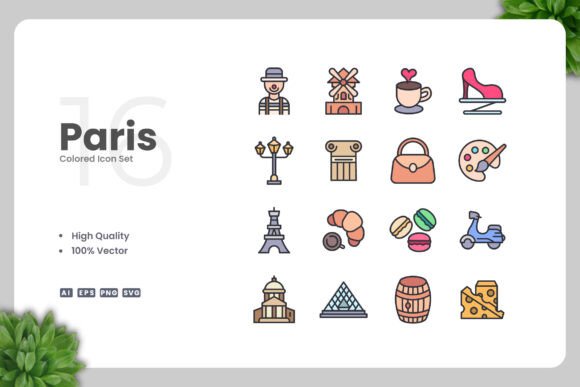
Paris Colored Icons: A Versatile Vector Icon Set for Modern Design Projects
When you are building a website, designing a mobile app, or preparing printed materials, the visual elements you choose have a direct impact on how your audience perceives your work. Icon sets are one of those foundational resources that can either elevate a project or make it feel inconsistent and cluttered. Paris Colored Icons is a vector icon collection that aims to offer a straightforward, customizable solution for designers and content creators who want clean, colorful visuals without the overhead of complex licensing or difficult file handling.
This article evaluates what Paris Colored Icons actually delivers, the practical tradeoffs involved in using it, the scenarios where it fits well, and the situations where you might want to consider other options. The goal is to help you decide whether this icon set aligns with your workflow, your project requirements, and your expectations for quality and flexibility.
What Is Paris Colored Icons?
Paris Colored Icons is a vector-based icon set that comes in multiple file formats, including Adobe Illustrator source files (Ai), EPS version 10, SVG, and transparent PNG. The icons are designed with a simple and clean aesthetic, using color to add visual distinction without overwhelming the viewer. The set is marketed as high-quality, fully customizable, and easy to integrate into projects ranging from websites and mobile apps to books, social media graphics, infographics, flyers, banners, posters, and other print materials.
The collection is provided by a seller named Upnowgraphic, and it is distributed as a digital download package that includes a readme text file with basic instructions. Because the icons are 100% vector, you can resize them to any dimension without losing sharpness, and you can change colors, strokes, and other properties using standard vector editing software such as Adobe Illustrator or CorelDRAW.
Why Someone Might Be Interested in Paris Colored Icons
There are several practical reasons a designer or content creator might consider this set. First, the vector format ensures that the icons are resolution-independent. Whether you need a tiny icon for a button or a large graphic for a poster, the same file works without degradation. Second, the inclusion of SVG and PNG files means you can use the icons directly in web projects or quickly drop them into presentations without needing to open a vector editor. Third, the colored design gives the icons a finished look out of the box, which can save time if your project calls for a cohesive color scheme.
Another factor is the simplicity of the design. Clean, minimal icons tend to age well and remain compatible with a wide range of visual styles. If you are working on a project that values clarity and readability, such as an infographic or a mobile app interface, icons that are not overly detailed can communicate meaning more efficiently. Additionally, the ability to customize colors and sizes means you are not locked into a specific look. You can adapt the icons to match your brand palette or adjust them for accessibility by increasing contrast or changing saturation.
Benefits and Advantages in Practice
For someone who works regularly with vector assets, the benefits of a set like Paris Colored Icons are largely about convenience and consistency. Having a single source file that contains all the icons in one place, organized and ready to use, can reduce the time spent searching for individual graphics. The drag-and-drop nature of the files, as described by the seller, means that even if you are not an expert in vector software, you can still incorporate the icons into your layout by simply placing them into your document.
The inclusion of an EPS Version 10 file is notable because this format is widely supported across different design applications, including older versions of software. If you work in a team environment where not everyone has the latest tools, EPS can be a reliable interchange format. The SVG files also offer compatibility with web development workflows, as they can be styled with CSS and scaled responsively. The transparent PNG files serve as a quick option for situations where you need a raster image and do not want to deal with background removal.
Customization is another strong point. Because the icons are vector objects, you can edit each element individually. You might change the color of a single shape, adjust the thickness of a stroke, or combine parts from multiple icons to create a new symbol. This level of control is valuable when you need to maintain a consistent visual language across a large project or when you want to create derivative icons that fit a specific theme.
Tradeoffs and Considerations to Keep in Mind
While Paris Colored Icons offers clear advantages, there are also tradeoffs that merit attention. One consideration is the scope of the icon set. The product listing does not specify exactly how many icons are included or the range of topics covered. If you need a very broad set that covers numerous categories, you may need to verify that the collection matches your requirements. A small or narrowly focused set might leave you supplementing with other sources, which can lead to visual inconsistencies.
Another factor is the aesthetic style. The simple and clean design is a deliberate choice, but it may not suit every project. If your brand or project calls for a more detailed, hand-drawn, or highly stylized look, these icons may feel too generic or flat. Similarly, if you work in a niche industry that uses specialized symbols, you may find that a general-purpose set does not include the exact icons you need.
There is also the question of color. The icons come pre-colored, which is helpful for quick use, but if your project uses a specific color palette that differs significantly from the one provided, you will need to spend time recoloring each icon. While vector editing makes this possible, it adds a step to your workflow. For projects with dozens or hundreds of icons, recolorization can become tedious unless you have a systematic way to apply changes, such as using global swatches in Adobe Illustrator.
File organization and naming conventions are another practical concern. The quality of the included files matters. If the icons are not logically named or grouped, you may spend extra time locating what you need. The readme.txt file may help, but it is worth considering whether you prefer a set with a dedicated icon management app or at least a well-structured folder hierarchy.
Expectations for Quality and Support
When purchasing a digital asset from a marketplace seller like Upnowgraphic, it is reasonable to expect a certain level of quality, but support options may be limited. The product description mentions high quality design and 100% vector, but you are usually relying on the seller's own quality control. Checking reviews, ratings, and sample downloads can give you a sense of whether the icons are produced with attention to detail, such as consistent stroke weights, proper alignment, and clean anchor points.
Support for file formats is generally good, as Ai, EPS, SVG, and PNG cover most common use cases. However, if you work exclusively with a non-Adobe vector tool like Affinity Designer, Sketch, or Figma, you may want to confirm that your software can handle EPS files or that the SVG files import cleanly. Some tools handle SVG differently, and you may encounter slight rendering variations or loss of editability.
Situations Where Paris Colored Icons Is a Strong Fit
This icon set is likely a good choice for projects where simplicity and clean lines are valued. For example, a mobile app interface that needs unobtrusive navigation icons, or a website that uses a minimal design language, can benefit from icons that do not compete for attention. Educational materials such as books or infographics also pair well with straightforward visuals that support comprehension without adding noise.
If you are working on a social media campaign or a series of promotional flyers that need to be produced quickly, having a set of pre-made, colored icons can speed up your workflow. The drag-and-drop file setup allows you to focus on layout and messaging rather than on creating icons from scratch. Similarly, for print projects such as posters and banners, the vector format ensures that the icons remain sharp at large sizes.
Another scenario is when you are prototyping. If you need to quickly mock up a user interface or a presentation, the included PNG and SVG files let you insert icons without needing to open a vector editor. This can be helpful for early-stage design reviews where the goal is to communicate a concept rather than produce final artwork.
When Alternatives May Be Worth Considering
There are situations where a different icon set may serve you better. If your project requires a very comprehensive collection with hundreds or thousands of icons covering a wide range of topics, you might prefer a larger set from a vendor that offers extensive categories, such as Font Awesome, Material Icons, or Noun Project. These alternatives often provide consistent naming, searchable libraries, and in some cases, open-source licensing that allows for broader use.
If your project has strict accessibility requirements, such as needing high-contrast icons or specific size-to-readability ratios, you may want to test the icons under those conditions. A set that is optimized for accessibility, with clear silhouettes and sufficient negative space, can be more reliable than a general-purpose set that was not designed with those standards in mind.
Another consideration is team collaboration. If multiple people need to edit and manage icons across a project, a cloud-based icon management service or a shared library within a tool like Figma or Adobe Creative Cloud might be more efficient than distributing files individually. Paris Colored Icons, by contrast, is a static file set that requires manual downloading and sharing.
For designers who work in specialized fields, such as healthcare, engineering, or finance, a domain-specific icon set may be necessary. General-purpose sets often omit the nuanced symbols that professionals in these fields rely on, and creating custom modifications can take time. In those cases, a targeted set or a custom icon design service might be more practical.
Practical Decision-Making Insights
When evaluating whether Paris Colored Icons meets your needs, start by listing the specific icons you require for your project. Compare that list against the sample images provided by the seller. If the set covers most of what you need, and the style aligns with your visual direction, then the convenience of having ready-to-use vector files can be a real time-saver.
Consider the formats you actually use. If your primary tools are Adobe Illustrator and CorelDRAW, the Ai and EPS files are directly compatible. If you work more in web-based tools, test the SVG files in your environment before purchasing. Also, decide whether the pre-colored design is an advantage or a limitation. If you plan to recolor the icons heavily, factor that time into your project schedule.
Licensing is another point worth clarifying. The product description does not detail the license terms. For commercial projects, you need to ensure that you have the right to use the icons in the way you intend, whether that is incorporating them into a product, distributing them in a template, or using them in client work. If the license is unclear, it may be safer to choose a set with an explicit commercial license.
Finally, assess your tolerance for supplementing the set. If the collection is missing a few icons that you need, can you find matching icons elsewhere, or are you willing to create them yourself? The consistency of the overall visual language depends on how well any added icons match the existing ones in style and quality.
Determining Whether It Aligns with Your Goals
For many designers and content creators, Paris Colored Icons offers a practical, no-fuss solution for adding clean and colorful visuals to projects. The vector format, the multiple file types, and the ease of customization make it a versatile asset for both digital and print work. The main considerations are the scope of the set, the specific style fit, and the time required for any recoloring or adaptation.
If your project prioritizes simplicity, efficiency, and a polished look without demanding a massive library of icons, this set may serve you well. If your project requires breadth, niche symbols, or strict accessibility standards, you may want to explore alternatives that offer those features by design. In either case, understanding what you are getting and how it fits into your workflow will help you make a confident choice.
Taking a few minutes to review the sample files, check the license terms, and verify compatibility with your tools can save you from surprises later. For many everyday design tasks, a well-made vector icon set like Paris Colored Icons can be a reliable addition to your resource library.