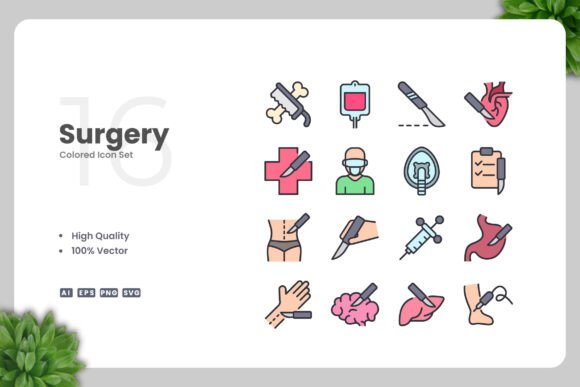
Surgery Colored Icons for Modern Design Projects
In a visual landscape where medical imagery often feels cold or overly clinical, finding the right balance between professionalism and approachability is key. The Surgery Colored Icons set steps directly into this gap. It offers a curated collection of surgical and medical-themed vector graphics that bring warmth and clarity to complex topics without sacrificing a polished, clean aesthetic. Whether you are designing for a healthcare app, a community health flyer, or a medical textbook, this set provides a versatile foundation that adapts to your specific workflow.
More Than Just a Collection of Scalpels
This set is built around the concept of simple and clean design. Each icon is rendered with clear lines and distinct, vibrant colors, making it easy to identify surgical tools, procedures, and medical concepts at a glance. The color palette is carefully chosen to be informative rather than distracting, which matters whether you're a professional designer building a brand identity or a small business owner creating your first promotional banner. The beauty of this set lies in its flexibility—it's designed to work as a complete visual language or as individual pieces you can drop into existing projects.
What You Actually Get in the Package
Understanding the technical assets included helps you decide if this set fits your workflow. The package is built around universal file standards:
- Source File Ai and EPS Version 10: These are the gold standards for vector editing. If you use Adobe Illustrator or CorelDRAW, you can open these files directly. Version 10 compatibility ensures they work even with older software, a critical detail for professionals maintaining legacy systems.
- SVG File: For modern web and app development, SVG is indispensable. It allows developers to embed icons directly into websites or mobile apps with full scalability and CSS styling control, all while keeping file sizes minimal.
- PNG Transparency: Not everyone works in vector software daily. The included transparent PNG files are ready to drag and drop into social media graphics, blog posts, or presentation slides without any additional editing.
- Readme.txt: A simple, clear guide to the assets. This is helpful for beginners who might be unfamiliar with opening or converting different vector file types.
Match Your Skill Level and Workflow
One of the core strengths of this set is how it serves people at different technical comfort levels. Your priorities will vary depending on your role and project.
For the Beginner or Hobbyist Building a Project
If you are new to design or handle your own marketing occasionally, ease of use is your top priority. You may not have Adobe Illustrator installed, and that is perfectly fine. The PNG Transparency files are your entry point. You can insert them directly into Canva, Microsoft Word, PowerPoint, or Google Slides. Imagine you are creating a flyer for a local health fair. Opening the folder, dragging a colorful stethoscope or syringe icon onto your poster, and having it blend seamlessly with your background takes only seconds. The clarity of these icons instantly makes your material look polished without requiring you to learn complex software.
For the Professional Designer or Studio Owner
For experienced users, the value proposition shifts from ease of use to customization and reliability. You care about the quality of the vector paths, the logical naming of layers, and the ability to fully manipulate the artwork. With the Ai and EPS source files, you can:
- Change the color of any icon to match a strict brand palette. Maybe your client's logo uses a specific teal and navy. You can edit the vector swatches in under a minute.
- Resize icons from a mobile app button to a building banner without any loss of resolution. Vector graphics are resolution-independent, so that scalpel icon will be sharp at 20 pixels wide or 20 feet wide.
- Combine, rotate, or modify elements. Perhaps you need to create a custom icon that merges a surgical mask and a heart monitor. Having the source vectors saves you hours compared to drawing from scratch.
For a freelancer, this set becomes a reliable part of your toolkit. You can confidently bid on medical or healthcare projects knowing you have a high-quality visual foundation to support your creativity.
Practical Applications Across Different Mediums
The versatility of Surgery Colored Icons is best understood through the lenses of different use cases. A single asset pack can serve vastly different end goals.
Digital Products: Websites, Mobile Apps, and Social Media
For a web developer or app creator, the SVG files are the star of the show. SVGs are lightweight code-based images that load quickly and scale perfectly on retina displays. You can use them as navigation icons, illustrations for blog posts, or supporting visuals for infographics. A marketer scheduling social media posts for a pharmaceutical company can pull the PNG files directly into a scheduling tool, using the medical icons to create consistent, recognizable weekly graphics for health tips or company updates. The clean design ensures that the icons don't clutter the image but instead add a professional, trustworthy tone.
Print and Physical Branding: Banners, Posters, and Flyers
Print demands high-resolution, scalable art. If you are a publisher creating a textbook chapter on surgical procedures, the EPS files are ideal. They can be placed into layout software like InDesign or QuarkXPress and printed at 600 DPI without pixelation. A hospital administrator or a small business owner opening a medical supply store could use the set to design in-store posters, directional signage, or branded packaging. The consistent visual language builds reliability, which is essential in health-related industries. Because the icons are colored, they can also be used to separate departments or categories visually—blue for lab services, green for surgery, red for emergency care.
A Deeper Look at the Technical Decisions
Why do these technical specifics matter to someone evaluating this set? Because they directly impact your return on investment and the longevity of the asset.
100% Vector and 100% Customizable means you are not stuck with a predetermined look. Icon trends change. Flat design, material design, or minimalism come and go. With vector source files, you can update the stroke weights, round the corners, or completely alter the color scheme to keep your visuals current. This is a significant advantage over purchasing non-editable raster images that may look dated in a few years.
The Easy Drag and Drop nature of the PNG files lowers the barrier to entry. An educator who needs to create a quick slide set for a Monday morning lecture can have professional-looking materials ready without calling IT support. An entrepreneur bootstrapping their health app can create compelling App Store preview screenshots using these icons without hiring a designer upfront. The set grows with you. You might start with the PNGs and, as your skills develop, move to the SVGs or source files for deeper customization.
Balancing Cost, Quality, and Time
Readers often balance three core factors: the cost of an asset, its quality, and the time it saves. Surgery Colored Icons addresses all three in different ways for different audiences.
- For the Cost-Conscious: Hiring a graphic designer to create a custom set of 20–30 medical icons can cost hundreds or thousands of dollars. Buying a pre-made, high-quality vector set is a fraction of that cost, providing immediate commercial value for small businesses and freelancers.
- For the Quality-Seeker: The description emphasizes "High Quality Design." For a professional, this means clean anchor points, consistent styling across all icons, and a cohesive color theory behind the palette. Good vectors are easier to work with and produce better final results.
- For the Time-Pressed: Speed is a priority for marketers and bloggers. If you need a visual for a blog post titled "Preparing for Surgery" tomorrow, having a ready-to-use, high-res PNG that matches your site's color scheme saves you an enormous amount of time. The drag-and-drop convenience is a direct answer to tight deadlines.
Is This Set Right for Your Project?
Deciding if this icon set matches your needs comes down to a few diagnostic questions you can ask yourself:
- What is your primary medium? If you are working exclusively in web development, the SVG files offer the best speed and flexibility. If you are a print designer, the EPS files provide reliable high-resolution output. If you use a mix of digital and print, the multiple format support means you're covered.
- How much control do you need? If you simply need a recognizable medical icon and don't foresee needing to change its shape or color, the PNG files are sufficient. If you anticipate building an entire brand system or matching specific client guidelines, the source Ai/EPS files are essential.
- What is your comfort level with design software? The set is explicitly compatible with Adobe Illustrator and CorelDRAW. If you are comfortable navigating these programs, you can unlock the full potential of customization. If not, the PNGs are a perfectly valid way to access high-quality visuals without a steep learning curve.
Long-Term Usefulness in a Changing Toolkit
A great icon set is an investment in your future communication clarity. Upnowgraphic has structured this collection to serve as a reliable foundation for healthcare-related visuals. The clean lines and thoughtful color choices reduce visual noise, allowing your audience to focus on the message rather than the graphic. For a blogger, this means conveying complex medical topics with simple, reassuring visuals. For a developer, it means building an intuitive and aesthetically pleasing user interface. For an educator, it means creating clear, unambiguous learning aids.
The simple and clean design philosophy ensures that these icons do not compete for attention. They support your content. They add a layer of credibility and visual interest without feeling overwhelming or childish. This balance can be surprisingly difficult to achieve with stock assets, and this set navigates it well by prioritizing clarity and aesthetic restraint.
Whether you are a hobbyist publishing your first health newsletter, a seasoned professional designing a hospital's annual report, or an entrepreneur building a medical device landing page, having immediate access to a unified, customizable, and high-fidelity visual language streamlines your process and elevates your outcome. Upnowgraphic's Surgery Colored Icons gives you the freedom to focus on your message, knowing the visuals are handled. Have a great day and enjoy building your next project.